

Laying the groundwork
The orchestration and management of data platforms enables enterprises to leverage the full potential of data insights. As organizations continue to evolve, the need to support sophisticated data modeling and machine learning techniques becomes more critical in driving business value.
Microsoft Fabric offers a comprehensive suite of tools that empower organizations to optimize their data workflows. At the heart of this platform is OneLake, a centralized storage solution designed to consolidate access and control over diverse data types, including structured, semi-structured, and unstructured data.
Effective teams often decentralize data responsibilities by various domains. Therefore, thoughtful design of Fabric workspaces is required to enhance collaboration and communication among data teams.
Fabric objects
The Fabric platform allows organizations to manage and deploy various data products in a shared or isolated environment. The key terminologies to know are:
- Azure tenant: A Microsoft Entra ID instance in which all Azure objects are mapped.
- Fabric capacity: A dedicated set of compute, storage, and networking resources that allow users to do data work.
- Fabric workspace: A container within the Fabric service used to organize items and enable collaboration between members.
- Fabric item: The lowest object in the hierarchy that contains a set of capabilities for users to build upon.
The hierarchy and relationship between each of these items is described in the following visual.

Capacity organization
Capacities represent a unit of compute resources that provides the ability to do work. They are often shared until capacity limitations, billing purposes, or geographic requirements intervene. For example, if there are two groups looking to use Fabric and they want to track billing separately and not share compute resources, then having two capacities would be appropriate.
However, within a capacity there can be many workspaces that share compute and storage resources between each other. Workspaces are purely organizational in nature and thoughtful design will lead to better collaboration, communication, and results for data teams.
We will cover the general organizational guidelines for Fabric and touch on asset organization as another optional method of separation.
Workspace organization
Effective collaboration and data asset development require workspace deployment and management. Teams can deploy the following workspace strategies:
- Data product
- Environment
- Centralization
Defining data product areas such as product, supply chain, or sales improves collaboration and encourages innovation within specific groups and ensures proper access controls by groups of individuals. This enables groups to have different workspaces depending on the domain they work in.

A centralized workspace approach with different workspaces for data certification levels (bronze, silver, gold) is commonly used in smaller organizations or groups within larger organizations.
For a centralized and data product approach we recommend having environment separation with at least a development and production workspace that allows teams to test and automate deployments, ensuring stability. A key decision with environment deployments is if workspaces should be on the same capacity. If multiple environments share a capacity, then the user is accepting that development workloads could take key compute resources from production ones.
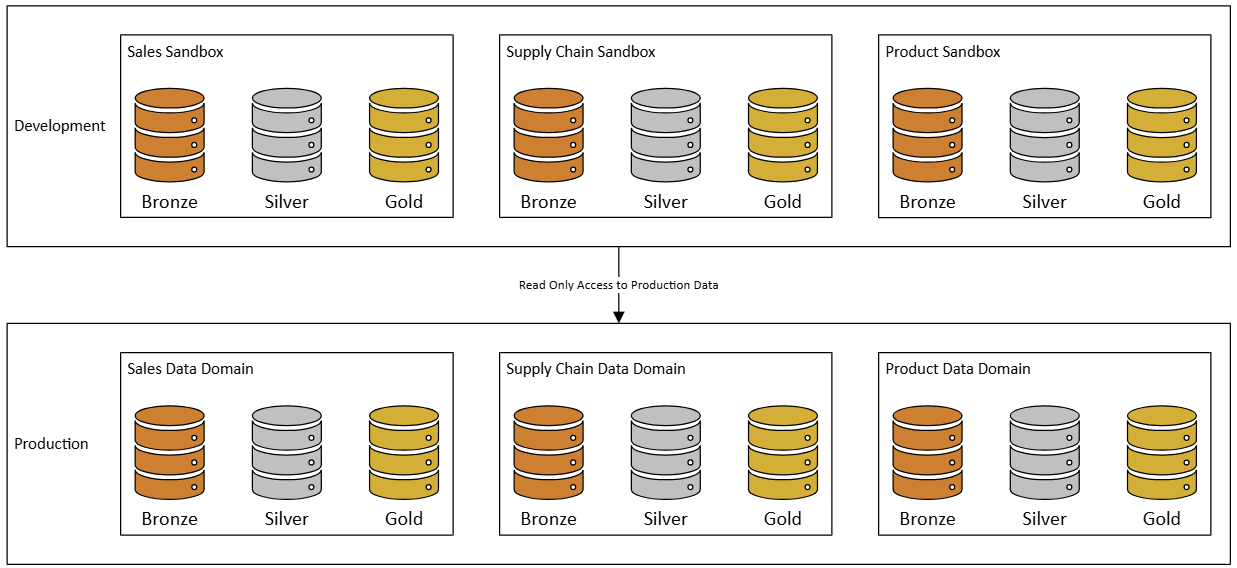
At an organization level, we recommend a mixed strategy in which the default for all groups is a centralized environment with separate bronze, silver, and gold workspaces. As needs and priorities change, groups can request additional workspaces by data product or domain. This helps prevent workspace proliferation and avoid over-consolidation that hinders innovation.
Asset types
There are several different types of assets within Fabric. To best manage the different types of resources, it may be best to split each asset type into their own workspace. For example, managing all your semantic models in a separate workspace(s) will give you more flexibility when deploying those assets and greater control over them. This also allows you to have a clear distinction between your business semantic layer and your back-end processing layer, which serves very different purposes and often different users.
With Power BI reporting in general, it is critical that you take advantage of the new project file format, PBIP. Power BI Projects enable users to save report and semantic model item definitions as individual plain text files in a simple, intuitive folder structure. This drastically improves the development lifecycle and release pipelines of analytics.
Workspace management
Within a workspace, engineers should manage assets across various workspace environments in Fabric using deployment pipelines. These pipelines are essential for controlling and transferring assets through development, testing, and production stages. Fabric environments should be leveraged to managed and configure compute. Native Fabric deployment pipelines offer a manual deployment option that facilitates a structured and systematized asset management approach.
Separating groups into different workspaces enables each group or individual to manage their own assets efficiently. Each workspace can be associated with a specific branch of the repository and deployment pipelines which enhances productivity by providing developers with a dedicated environment to work on their projects.
As a general example, below is an outline of a sample implementation organizing Fabric workspaces into four separate personas or domains. Each of these domains has an area for development, test, and production with deployments being managed through Fabric deployment pipelines.

- Data Science — All data science items will be hosted in these workspaces (Notebooks, ML models, experiments, and lakehouses). The data lakehouses will have read access to production data while having write access to a sandbox location before publishing into a production location.
- Data Engineering — The location for all data and data transformations. These will also include all notebooks for data transformation needs.
- Semantic Model — Where all the semantic models will be mastered. These semantic models will be used to power all the Power BI reports.
- BI Reporting — Locations where all Power BI reports will be mastered. Report distribution will be through Published Apps off the Production workspace.
Key takeaways
Successfully managing workspaces in Microsoft Fabric hinges on striking the right balance between organization, governance, and collaboration, tailored to the unique needs of the organization. There is no one-size-fits-all solution, but thoughtful planning can make all the difference. Too little structure may result in difficulties managing and govern the assets at an organizational level, while an overly distributed design could lead to inefficiencies and bottlenecks in the development process.
Need help organizing your Fabric environment or planning your data architecture? Inviso’s experts can help you design scalable, efficient solutions for our organization. Get in touch to learn more


